Every new gadget feels exciting for about a week. So how do you pick devices that still earn their place months later? This guide to gadgets and gizmos explains the words, the main categories, and a simple way to choose. Along the way it covers cool tech gadgets, smart home picks, travel gear, and the gimmicks to skip.
What Are Gadgets and Gizmos?
A gadget is a small, useful device or tool that makes a task easier. A gizmo is often a clever or novel device, sometimes one whose purpose is more fun than serious. In everyday speech the two words overlap, so most people use them for the same kinds of products. This guide treats them as one group: small devices that should solve a problem or bring real enjoyment.
Main Categories Readers Care About
The world of gadgets and gizmos is wide, so it helps to sort it into groups. Most readers care about a handful of areas, and each one solves a different kind of problem. The list below shows the common ones.
- Home and smart home: smart plugs, locks, and cameras
- Audio: earbuds and portable speakers
- Wearables: smart rings, watches, and health trackers
- Desk gear: keyboards and trackers for lost items
- Kitchen tech: devices that speed up cooking tasks
- Travel gear: portable chargers and compact speakers
Smart Home Gadgets
Smart home gadgets such as plugs, locks, and cameras aim to make daily routines easier. A smart lock, for example, can be easier to use than a loose key. Before you buy, check that the device works with your phone and your home system. Cameras and microphones also raise privacy questions, so read the data and storage settings first.
Audio and Wearables
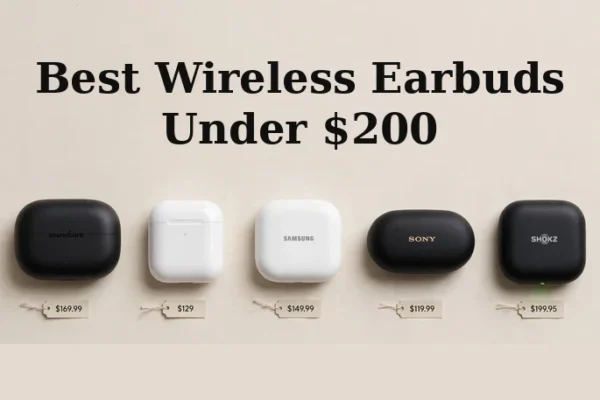
Earbuds and portable speakers are popular because they solve clear problems, like private listening or filling a room with sound. Wearables such as smart rings, watches, and health trackers collect data about your day. Treat health readings as general guidance, not medical advice. Check battery life and app requirements, since some features depend on a phone app or a subscription.
Desk and Office Tools Next to Gadgets
Not every useful tool is a physical device. Everyday software, such as a PDF to Word converter, sits beside your keyboard and tracker as part of a working setup. Gadgets handle hardware tasks, while software handles file tasks. Together they make a desk run smoothly.
Building a Better Desk Setup
A good desk starts with comfort and a clear job for every device. For ideas on keyboards, lamps, and organizers, see our list of the best desk gadgets. Add one item at a time so you can tell what actually helps. Keep cables tidy, because a messy desk can cancel out the benefit of any gadget.

Best Gadgets 2026: What to Look For
Many lists promise the best gadgets 2026 has to offer, but products and prices change quickly. TechWeeklys has not tested any device in this guide hands on, so we do not name winners. Instead, look for gadgets that solve one real problem, work with your phone or home system, and come with a clear warranty. Recheck prices and specs on the seller’s page before you buy.
Cool Tech Gadgets That Solve Real Problems
Useful gadgets earn their place when they fix a daily annoyance. A smart lock can make entry simpler, an outlet extender can reach behind furniture, and a tracker can find lost keys. A good portable speaker can fill a room without a full sound system. These examples show types of products, not tested picks or endorsements.
Travel and Kitchen Gadgets
Travel gear works best when it is small and dependable. Portable chargers and compact speakers are common choices for trips. Kitchen tech, such as timers and cooking helpers, can save time if you cook often. Before you pack or buy, check weight, battery life, and whether the device needs an app.
How to Choose a Gadget
When you shop for gadgets and gizmos, start with the problem you want to solve. Then check compatibility with your phone or home system, battery life, and whether an app is required. Look at privacy settings, the warranty, and the total cost, including any subscriptions. Write down your top two needs, and skip anything that does not meet them.
Gimmicks to Avoid
Be careful with gadgets and gizmos that offer novelty and little else. A device you use once and forget is a poor buy unless the fun itself is the point. Ask yourself whether you would still want it after a month. If the answer is no, put the money toward something that helps every day.
Where to Find More Gadget Advice
If you want more practical help, browse the tech guides on TechWeeklys. We cover AI, startups, cybersecurity, gadgets, and reviews. Check back when you plan your next purchase, since prices and features change often.
Conclusion
Good gadgets and gizmos solve a real problem, fit your devices, and respect your privacy. Start with your need, check compatibility and total cost, and ignore hype. Prices and specs change often, so confirm details before you buy. A few well chosen devices beat a drawer full of toys.
Frequently Asked Questions
What are gadgets and gizmos?
They are small devices or tools. A gadget usually solves a task, while a gizmo is often a clever or novel device. In daily use, the words overlap.
Are smart home devices a privacy risk?
They can be, especially cameras and microphones. Check what data they collect, where it is stored, and who can see it. Keep the device updated and use strong account settings.
How much should I spend on a gadget?
There is no single answer. Compare the total cost, including subscriptions, against how often you will use it. Prices change, so recheck them before buying.
How can I avoid gimmick gadgets?
Ask whether the device solves a problem you have today. Be wary of single use items. Read the warranty and return policy before you commit.
Read More
Keep exploring more Tech Weeklys guides: